How to Use BMIbite: Body Data & Weight Plan, Step by Step
A short walkthrough of the first two tabs of the BMIbite tool: calculate where you are on Body data, then turn those numbers into a realistic plan on Weight plan. The whole flow takes about two minutes.

How the Tool Is Organized
Open the BMIbite tool and you will see three tabs at the top:
- Body data — your starting point: a BMI calculator and a daily calorie needs (TDEE) estimate.
- Weight plan — turns your numbers into a target weight, a timeline, and a suggested daily intake.
- Food Calorie Calculator — look up the calories and nutrients of specific foods, including a barcode scanner for packaged products.
The first two tabs are designed to work as a chain: each one feeds its results into the next. Follow the two steps below in order and every number will stay consistent.
1Body Data: Find Out Where You Are
The BMI calculator
Enter your height and weight, then tap Calculate BMI. You will get your BMI value, its category (underweight, normal, overweight or obese), and the healthy weight range for your height.
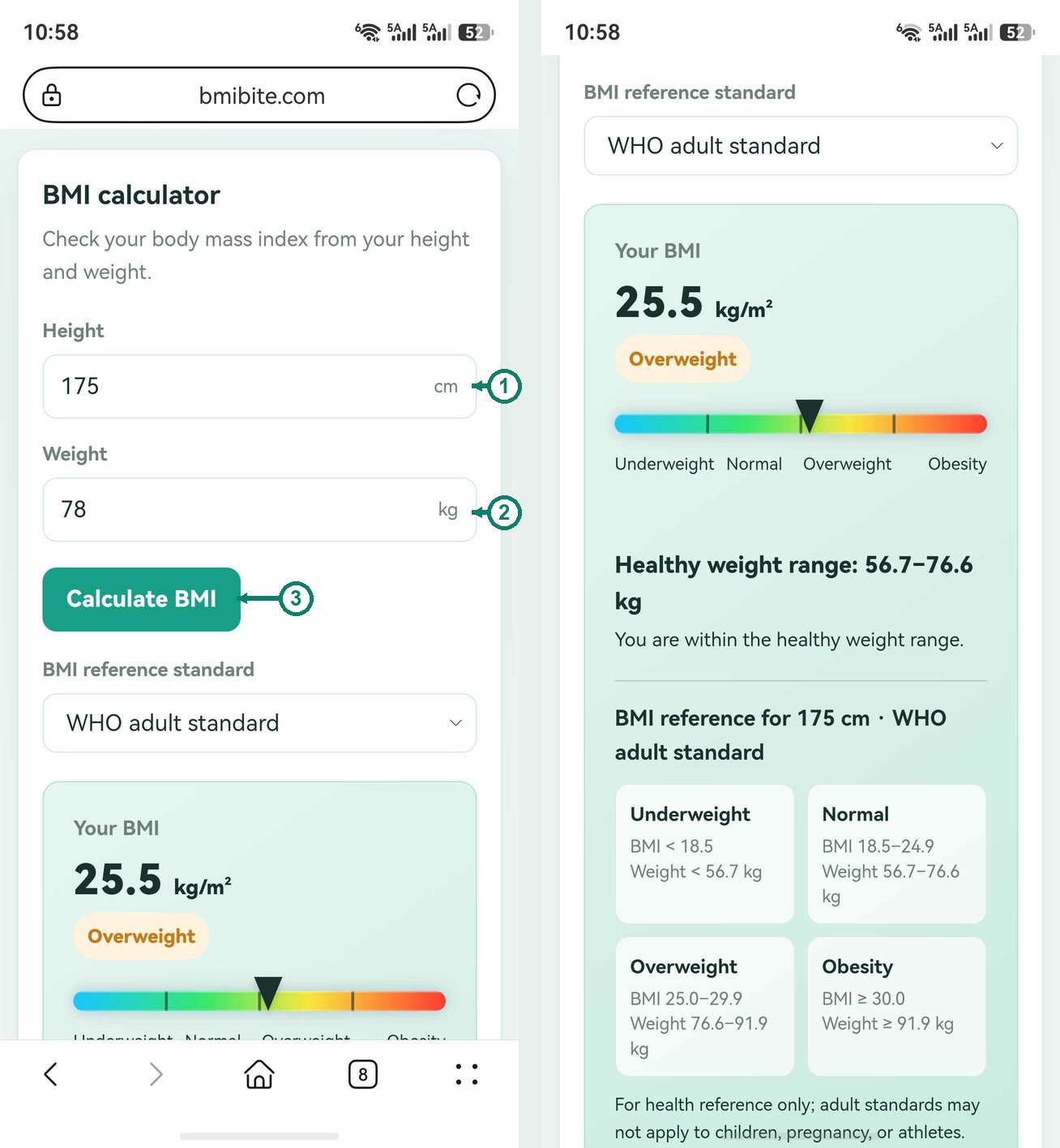
Below the inputs there is a BMI reference standard selector. BMIbite offers two:
- WHO adult standard — the international default (normal weight is 18.5–24.9).
- Chinese adult standard — slightly stricter, with overweight starting at 24.
Pick the one that matches your region or your doctor's guidance — switching it re-labels your result instantly, no need to re-enter anything.
Daily calorie needs (TDEE)
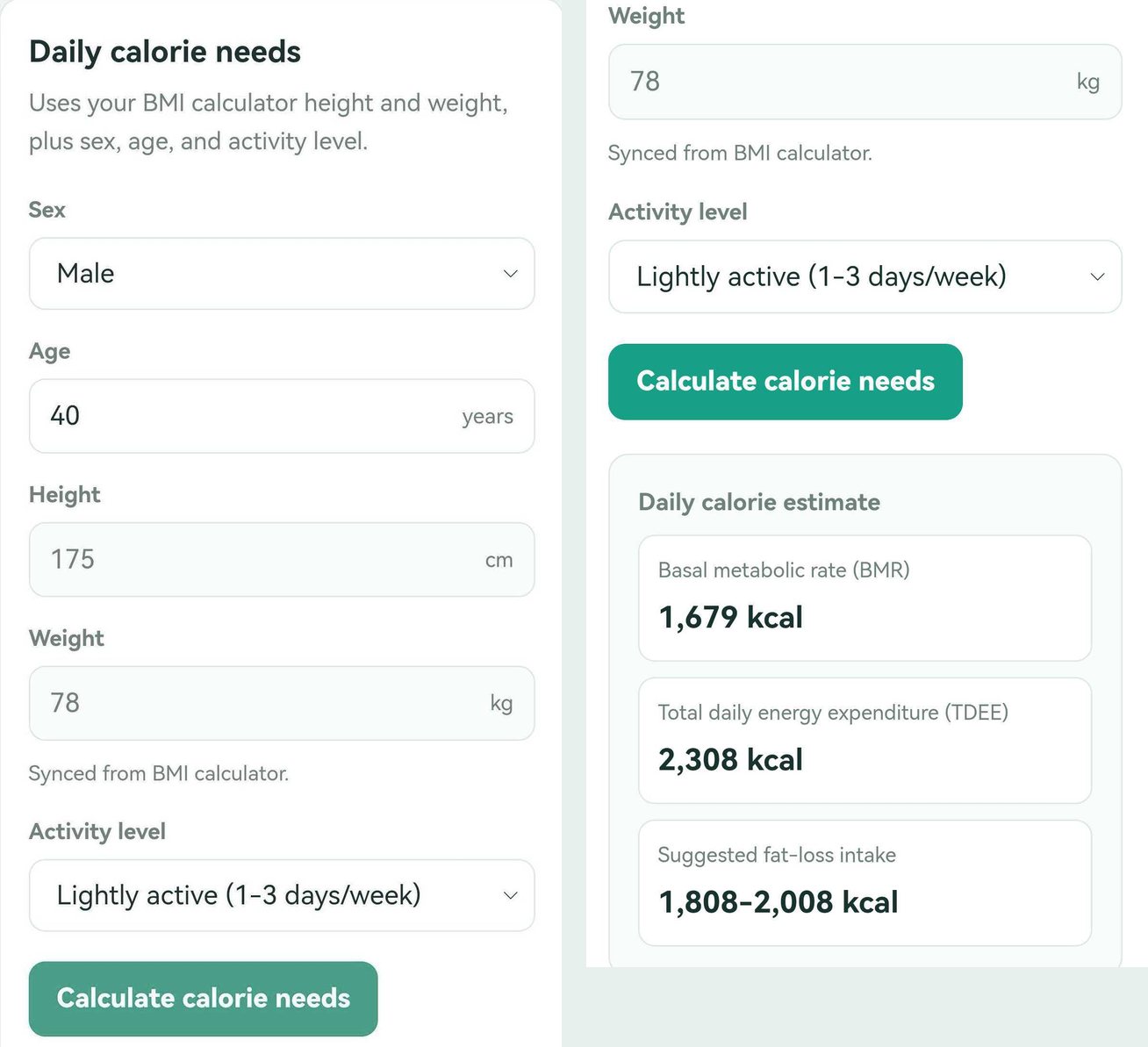
The second card on the same tab estimates how many calories you burn per day. Notice that height and weight are already filled in — they sync automatically from the BMI calculator, so you only add three things:
- Sex — male or female (basal metabolism differs between them).
- Age — calorie needs fall gradually with age.
- Activity level — be honest here, from sedentary (little exercise) up to extra active (physical work or intense daily training). When in doubt, choose the lower option.
Tap Calculate calorie needs and BMIbite shows how much energy your current height and weight actually burn: your basal metabolic rate (BMR), your total daily energy expenditure (TDEE), and a suggested fat-loss intake range — the number your weight plan will be built from.
Calculate Your Calorie Needs →
2Weight Plan: Turn Numbers Into a Goal
Switch to the Weight plan tab. Fill in the left card:
| Field | What to enter |
|---|---|
| Current weight | What you weigh today — weigh yourself in the morning for consistency |
| Target weight | Where you want to be; keep it inside your healthy BMI range |
| Target timeline | How many weeks you are giving yourself (12 is a sensible default) |
| Current maintenance calories | Filled in automatically from your Body data result — this field is read-only |
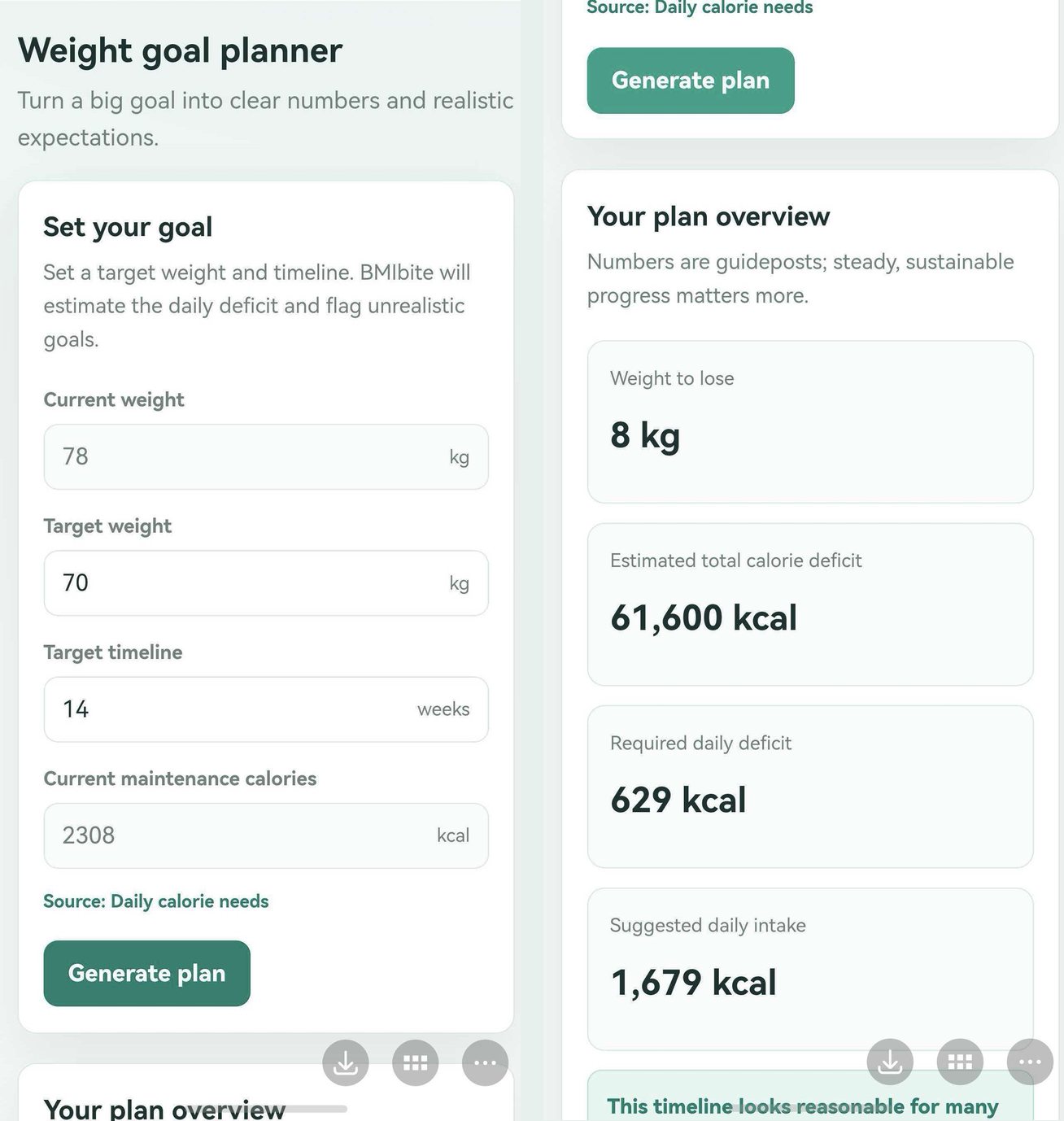
Then tap Generate plan. The overview card on the right shows four numbers:
| Number | What it means |
|---|---|
| Weight to lose | The gap between your current and target weight |
| Estimated total calorie deficit | Total calories you need to shave off over the whole timeline |
| Required daily deficit | That total divided across your weeks — your daily “budget” |
| Suggested daily intake | Maintenance calories minus the required deficit — your daily eating target |
Not sure whether your target is realistic? Compare the required daily deficit with your maintenance calories. If the deficit approaches a third of what you burn, the plan will feel punishing — add a few weeks to the timeline instead.
Why Some Timelines Get Blocked
If a goal demands an unusually large deficit or a very fast weekly loss, BMIbite deliberately hides the intake suggestion and recommends a slower timeline. That is a safety feature, not a bug: crash dieting below your basal metabolic rate risks muscle loss, nutrient gaps and rebound weight gain. A gradual pace of about 0.5–1 kg per week is the range most guidelines consider sustainable.
The planner also explains its math under the results — open How this plan is calculated to see the assumptions behind the numbers.
The Whole Flow at a Glance
- Body data → BMI calculator: height, weight, pick a standard, Calculate BMI.
- Body data → Daily calorie needs: sex, age, activity level, Calculate calorie needs.
- Weight plan: current weight, target weight, weeks, Generate plan.
- Food Calorie Calculator: use your suggested daily intake to plan real meals — search foods by name or scan barcodes.
Frequently Asked Questions
Do I need to calculate my BMI before making a weight plan?
Yes. BMIbite works as a chain: the height and weight you enter in the BMI calculator sync into Daily calorie needs, and the resulting maintenance calories sync into the Weight plan. Doing the steps in order keeps every number consistent.
Why can't I type my own maintenance calories?
The maintenance-calories field is read-only on purpose. It is filled automatically from your Body data results so the plan is always built on the same numbers, instead of a stale value typed in earlier.
How fast is it safe to lose weight?
A gradual rate of about 0.5–1 kg (1–2 lb) per week is commonly recommended. If your timeline would require an extreme daily deficit, BMIbite hides the intake suggestion and recommends a slower pace instead.
Go Deeper
- Understand the theory behind step 1: How to Calculate TDEE.
- Pick a target inside the healthy zone: What Is a Healthy BMI? Chart & Weight Range.
- Already have a plan? The Ultimate Weight Loss Planner goes deeper into deficits and timelines.